ScaleBridge: Reclaiming My Bluetooth Scale from Its App
The stock app wanted four taps and a subscription pitch before it would read my scale, and never synced to Apple Health. So I built a native iOS replacement with 22 body metrics, HealthKit sync, and widgets.

Shubham Singh
ios
swift
swiftui
bluetooth
healthkit

Standing on a scale takes about five seconds. Getting the app ready to receive the reading took longer than that, every single morning.
I have a HealthifyMe smart scale. The hardware is genuinely good. You step on it barefoot and it measures your weight and your bioelectrical impedance, and from those two things you can derive body fat, muscle, water, and a dozen other numbers. So my problem was never the scale. It was everything sitting between me and the scale.
Four taps, plus whatever the app felt like showing me
Even on a good launch, with nothing interrupting me, it was four taps before the app reached the screen that actually starts listening for the scale over Bluetooth. Four taps to reach the point where I could stand on a thing I was already standing next to.
And that was the floor, not the average. HealthifyMe isn't a scale app. It's a whole health platform: workout plans, an AI coach, calorie tracking, sleep, water intake. Most of that is subscription funded, so most launches opened with a pitch. Subscribe, or here's a limited time offer, or here's what you're missing. Dismiss, navigate, dismiss, navigate, weigh in.
I want to be fair here, because this isn't incompetence. If your product is a broad subscription health platform, then the app's job on launch is to sell you the platform. That's a perfectly coherent business decision. It just doesn't match the one thing I opened it for, which was to find out what I weigh.
The part I couldn't rationalize was Apple Health. There's no sync. Not on the free tier, and not on the paid one either. I went through the settings twice because I assumed I'd missed a toggle somewhere. My weight history lived in HealthifyMe's account and nowhere else, which meant every other health app on my phone had no idea I even owned a scale.
So the scale measures my body, and somebody else's app decides what I'm allowed to do with the result. That's the bit that finally annoyed me enough to do something about it.
The scale was never the problem
Here's what turned an annoyance into a weekend project. The scale doesn't care which app it's talking to.
The HealthifyMe scale is a rebranded QN/Yolanda body-composition scale, the same white-label hardware that ships under a lot of different brand names. It speaks a Bluetooth LE protocol that's well understood, because openScale, a GPLv3 Android project, has had a mature handler for it for years. The scale advertises a service, streams frames, and any client that speaks the protocol gets exactly the same numbers.
There's no proprietary magic in the app. The app is just a client. Which meant I could write a better client.
ScaleBridge
ScaleBridge is a native iOS app that does one thing. It bridges a QN/Yolanda scale to Apple Health.
Open it, tap Weigh in, step on the scale. That's the entire flow. No account, no subscription, no upsell, because there's nothing to sell you.
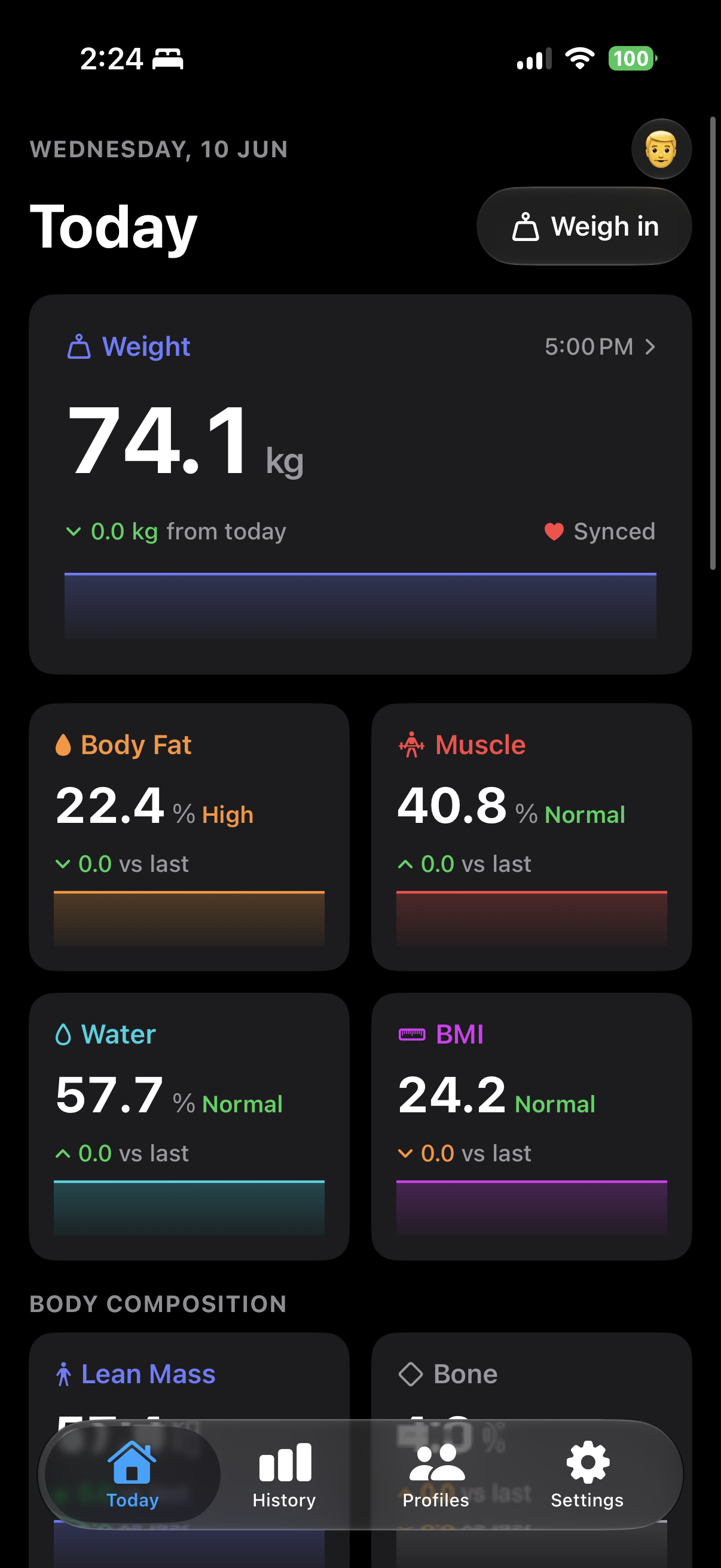
It's SwiftUI on iOS 26, using the Liquid Glass tab bar and system colors throughout, so it looks like it belongs on the phone rather than like a web view in a trench coat.
Talking to the scale
The BLE work is a port of openScale's QNHandler to Swift and CoreBluetooth. The scale exposes one of two service layouts, FFE0 (type 1) or FFF0 (type 2), and the handshake is a short conversation:
| Frame | Direction | Meaning |
|---|---|---|
0x12 | scale → app | Scale info. Tells you the weight scale factor (÷100 or ÷10) and a protocol-type byte you have to echo back |
0x13 | app → scale | Unit config (kg or lb), plus a time sync on a 2000-based epoch |
0x14 | scale → app | Acknowledgement |
0x20 | app → scale | Time sync reply |
0x10 | scale → app | Live weight frames, streaming while you stand there |
In code that collapses into a pleasantly boring dispatch:
1func onNotification(characteristic: CBUUID, data: Data,
2                    user: ScaleUser, transport: ScaleTransport) {
3    let b = [UInt8](data)
4    guard b.count >= 3 else { return }
5
6    if seenProtocolType == 0 { seenProtocolType = b[2] }
7
8    switch b[0] {
9    case 0x12: handleScaleInfo(b, user: user)
10    case 0x10: handleLiveWeight(b, user: user)
11    case 0x14: sendTimeSync()
12    default:   transport.log("QN: opcode 0x\(String(b[0], radix: 16))")
13    }
14}
The 0x10 frames carry the payload. Bytes 3 and 4 are the weight, big-endian. Byte 5 is a state flag. Bytes 6 and 7 are the impedance. One firmware variant, the ES-30M, shifts all of that along by a byte and uses the ÷10 factor instead, so you detect it and handle it separately.
One structural decision paid for itself almost immediately. The parser never touches CoreBluetooth. It talks to a ScaleTransport protocol that the BLE manager implements:
1protocol ScaleTransport: AnyObject {
2    func write(service: CBUUID, characteristic: CBUUID, data: Data, withResponse: Bool)
3    func setNotify(service: CBUUID, characteristic: CBUUID)
4    func log(_ message: String)
5}
That's openScale's handler and adapter split, and it means the protocol logic is portable and testable without a real scale and a real body standing on it. Supporting a different scale is a new ScaleParser conformer, and the BLE plumbing and the HealthKit sink don't change at all.
The scale only measures two things
This is the part I underestimated.
ScaleBridge shows 22 metrics. The scale measures two. Weight, and bioelectrical impedance, which is how much your body resists a small current passed up one leg and down the other. Fat, water, muscle, bone, BMR, metabolic age, all of it comes out of regression formulas fed by those two numbers plus your age, height and sex.
I ported the formulas from openScale's TrisaBodyAnalyzeLib, which is why ScaleBridge is GPLv3 too. They look like this:
1func fat(_ weightKg: Float, _ z: Float) -> Float {
2    let b = bmi(weightKg)
3    return isMale
4        ? b * (1.479 + 4.4e-4   * z) + 0.1 * Float(ageYears) - 21.764
5        : b * (1.506 + 3.908e-4 * z) + 0.1 * Float(ageYears) - 12.834
6}
And that's where both of my favorite bugs came from. They share a failure mode. The app produced numbers that looked completely reasonable and were wrong.
The impedance was getting crushed
openScale's Trisa library normalizes impedance before feeding it to the formulas, roughly z = 0.3 * (r1 - 400), because that's what Trisa hardware needs. I ported the formulas and the normalization together, which seemed obviously correct at the time.
QN scales report raw resistance in ohms, usually somewhere between 400 and 600. Running that through the Trisa normalization squashes the range by about 18x. And since z appears in every formula with a small positive coefficient, everything downstream lands low but still plausible. My body fat read about 17%. The scale's own display said 22%.
Nothing crashed. No value looked absurd. It was just quietly wrong by six percentage points, which for a number you're tracking over months is worse than a crash. A crash you notice. The fix was deleting the normalization and passing raw impedance straight through.
Reading a state as a boolean
The 0x10 frames have a state byte. I read it as "is the weight stable yet", published the first frame where it was set, then latched so everything after it got ignored.
It isn't a boolean. It's a state. 0 means still ramping, 1 means the weight has locked, 2 means the measurement is complete. The scale runs its bioimpedance pass after the weight locks, so a state-1 frame can quite legitimately carry a settled looking weight with impedance still sitting at zero. And on firmware that flags the final frame with state 2, the real frame was getting thrown away by the latch.
So two things went wrong at once. The published weight was lower than what the scale itself displayed, and impedance came through as 0, which the formulas happily accepted. They returned a full set of body-composition numbers derived from nothing at all.
The fix reads the state as a state:
1// A frame carrying impedance, or explicitly flagged complete, is the final word.
2if r1 > 0 || state == 0x02 {
3    cancelFallback()
4    publish(weightKg: weightKg, r1: r1, user: user)
5    hasPublished = true
6    return
7}
8
9// state 1 with no impedance yet: hold it, let the scale finish.
10trackCandidate(weightKg, user: user)
If impedance never turns up, because of bad foot contact or socks or a reading cut short, it falls back after three seconds to a weight-only reading. But only once the weight has held within 0.1 kg across three consecutive frames. And in that case it publishes only what was genuinely measured:
1guard r1 > 0 else {
2    var m = ScaleMeasurement(weightKg: weightKg, impedance: 0)
3    m.bmi              = lib.bmi(weightKg)
4    m.standardWeightKg = lib.standardWeight()
5    m.weightControlKg  = lib.weightControl(weightKg)
6    onMeasurement?(m)   // body composition stays nil
7    return
8}
Weight, BMI, and the two metrics that need nothing more than weight and height. Body fat stays nil instead of becoming a confident fiction. I'd rather the app admit it doesn't know.
Apple Health, at last
The entire reason the project exists, and it's one of the smallest files in it.
HealthKit has native sample types for body mass, body fat percentage, lean body mass and BMI. It has none for body water, muscle or bone percentage, so those stay in the local store. The primary profile's readings sync, and everyone else is local only.
The one gotcha worth knowing is that HealthKit wants percentages as fractions:
1if let fat = m.fatPercent {
2    // HealthKit expects a fraction (0–1) for percentage types.
3    samples.append(sample(.bodyFatPercentage, .percent(), Double(fat) / 100.0))
4}
There was a third invisible failure living in here. Authorization errors were getting thrown away with try? and the save catch block was empty. iOS only shows the Health permission sheet once per install, so when a request failed, which in my case was a missing entitlement on a re-signed build, it looked exactly like a working install that simply had nothing to write. Now the writer records what happened instead of discarding it, and Settings shows the real status along with the underlying error.
Three bugs, and all three were silent. Two of them invented numbers, and the third invented success.
The things I actually wanted
Once the data was mine, the rest was just building the app I'd wanted in the first place.
Multi-profile. The body-composition formulas depend on age, height and sex, so a shared scale needs a profile per person. Profiles are SwiftData models, and age is derived from date of birth rather than stored, so it never goes stale. One profile is marked primary, and that's the one that reaches Apple Health.
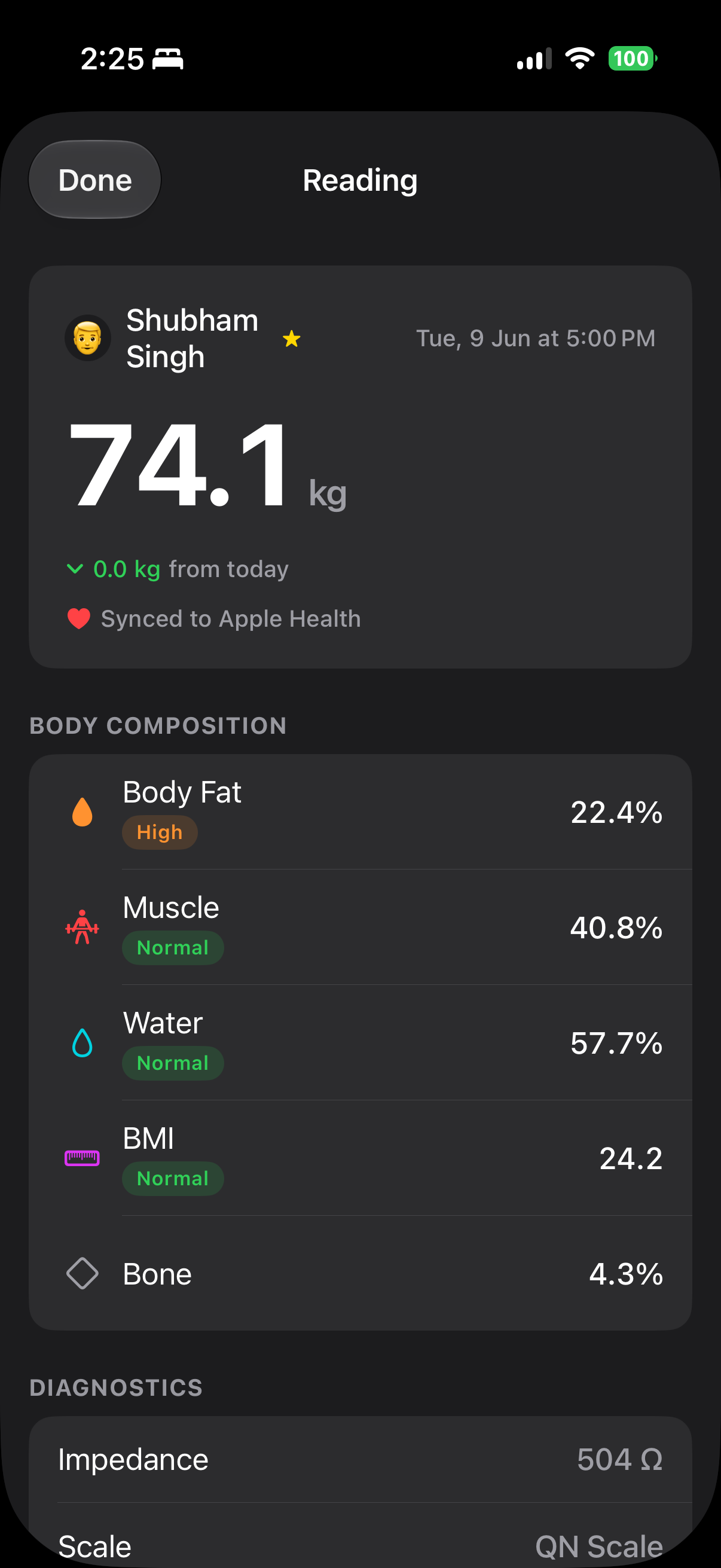
22 metrics with context. A number on its own is useless. Every metric gets a Low / Normal / High / Very High band and a goal hint, so "22.4%" turns into "22.4%, High, decrease by 2.4% to reach normal".
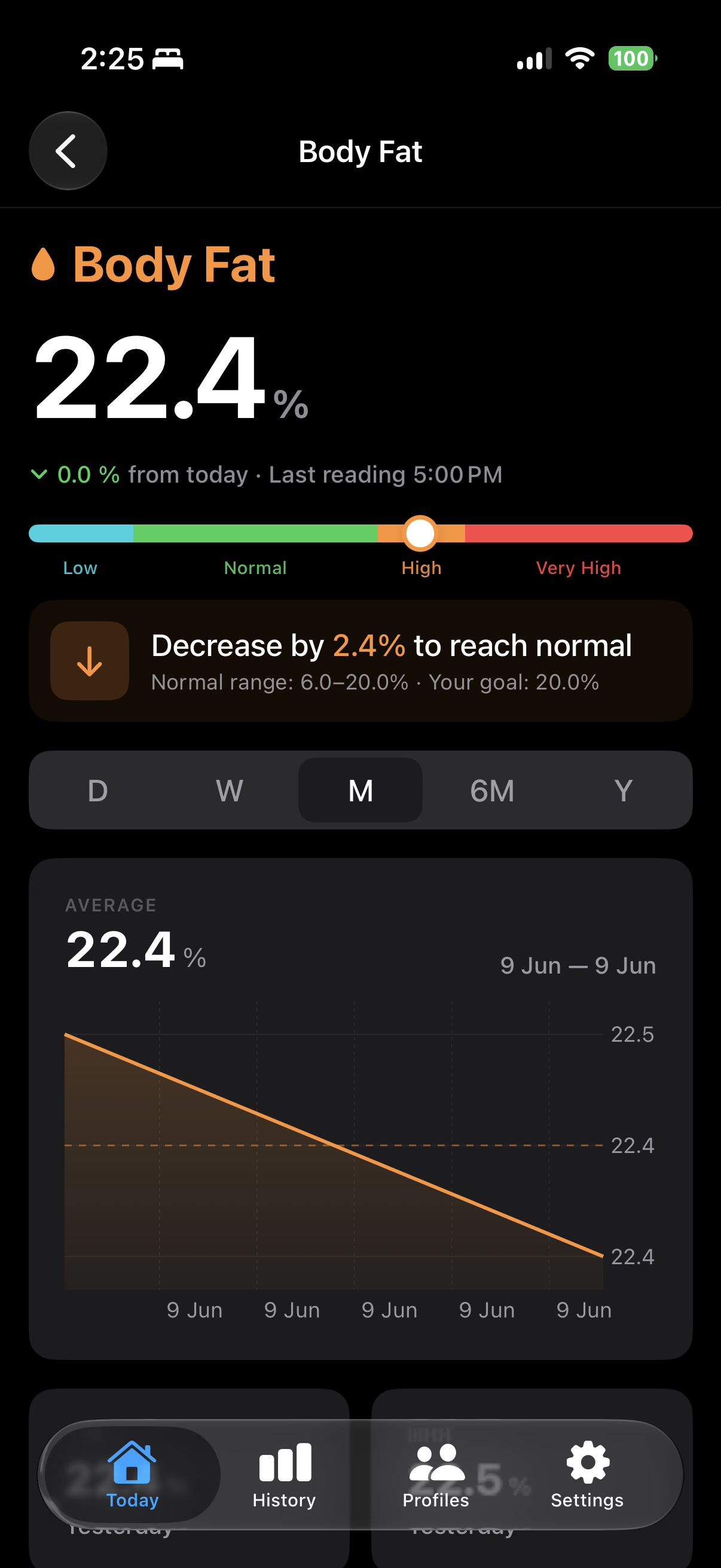
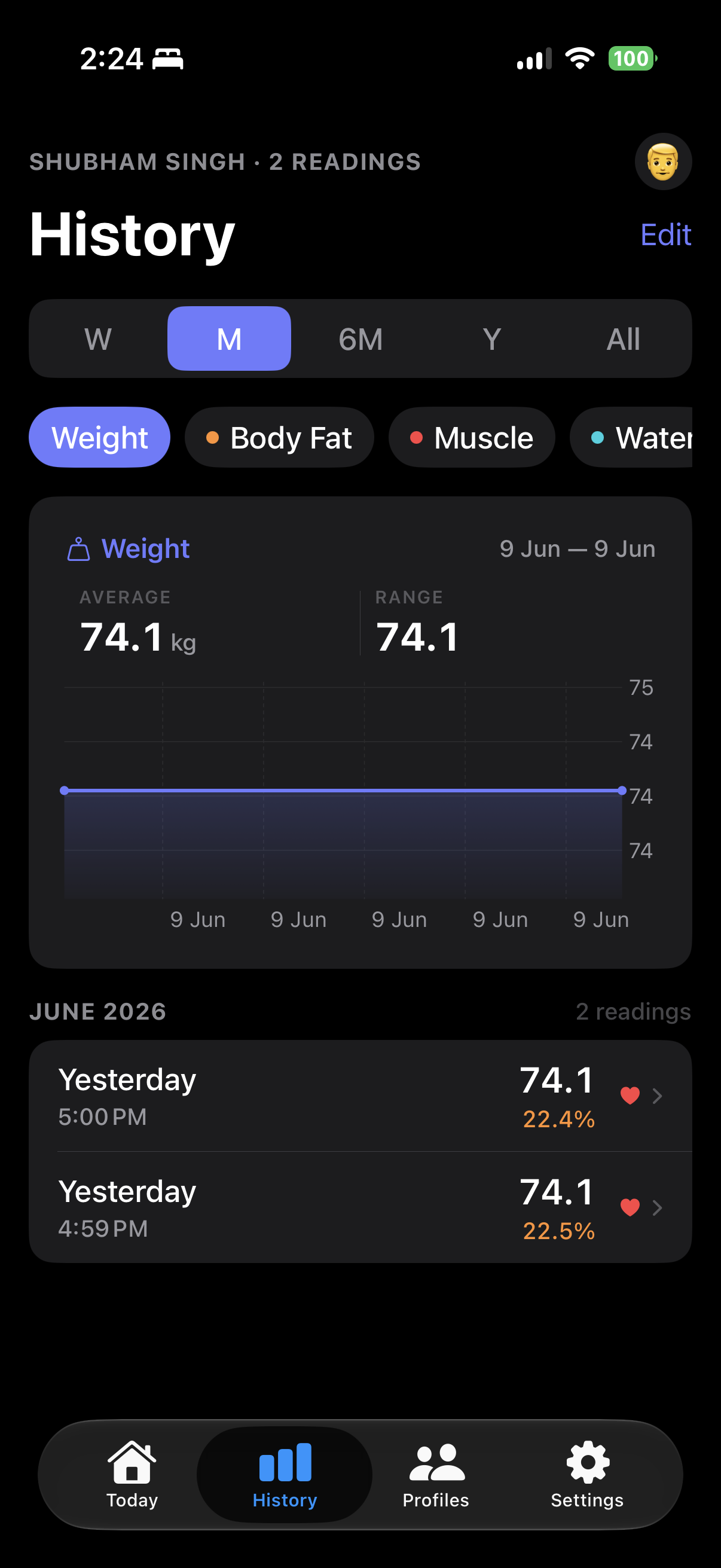
Trends. Per-metric charts across day, week, month, six months, year and all time.
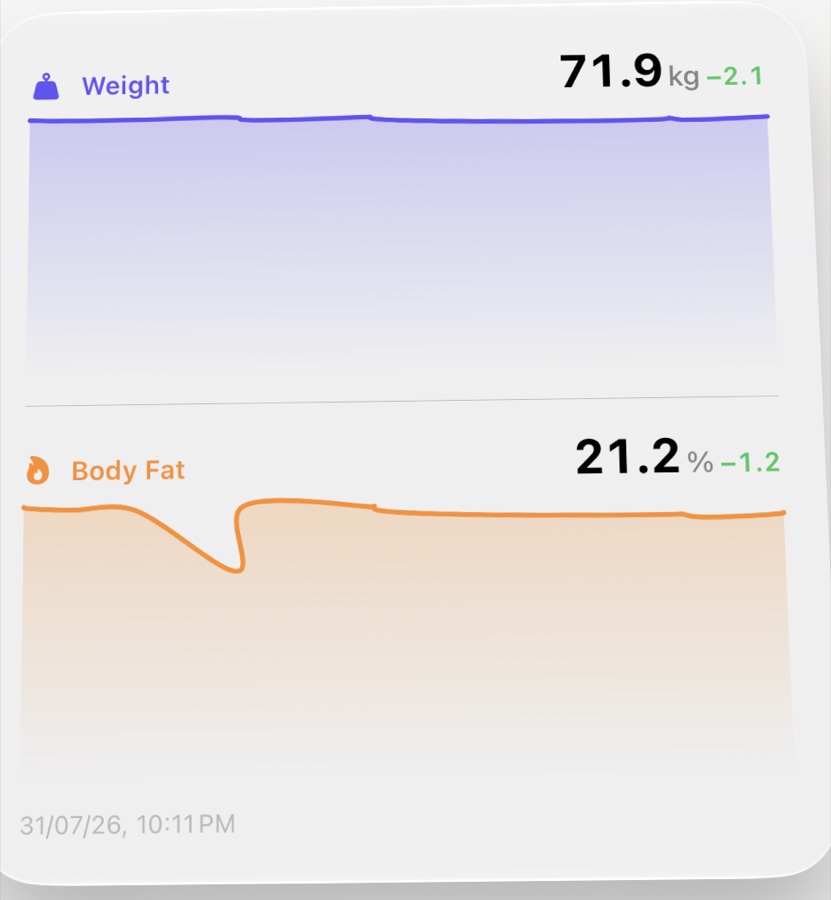
Widgets. Home screen and lock screen, fed through an app group. On every weigh-in the app writes the latest reading and a 14-point history into shared defaults, which is everything the widget extension needs to render without launching the app at all.
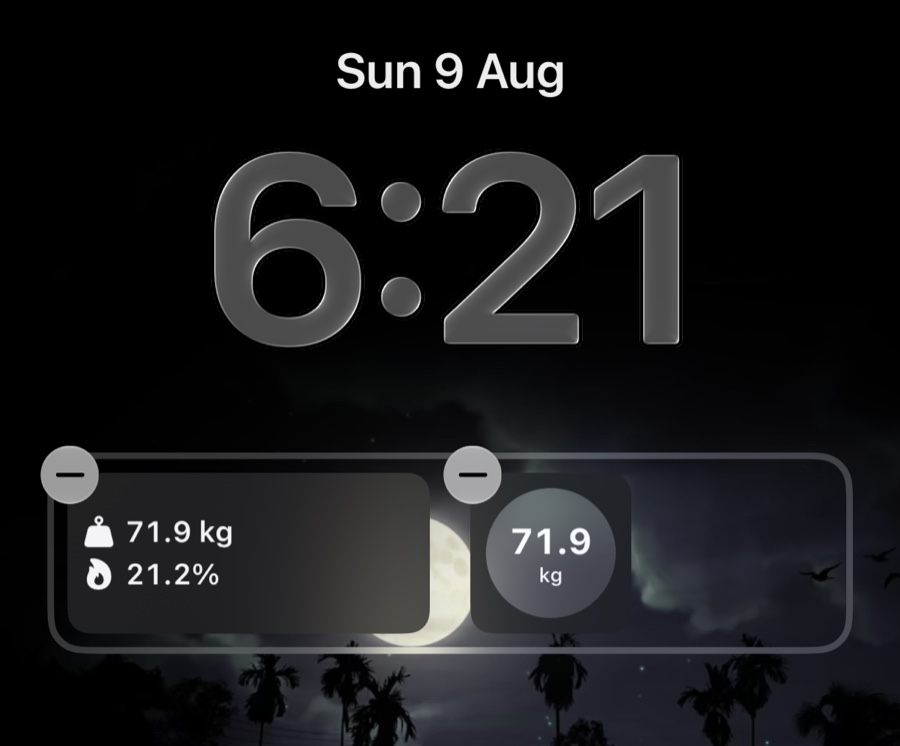
The lock screen gets weight and body fat inline, or a circular complication with just the number. On the home screen, the Body Chart widget draws both trends straight from that shared history:
Cloud backup. Sign in with Google and your readings sync to Firestore. This one had the sharpest edge on it, and it wasn't the upload path, it was deletion. upload() is additive. It writes the records that still exist locally and never removes anything. So deleting a reading on the phone left it sitting in the cloud, and the next restore brought it straight back from the dead.
The fix is tombstones. Deleted IDs get recorded locally and flushed on the next sync, so a delete you make while offline or signed out doesn't get lost. The tempting alternative, diffing cloud against local, is a trap. Run that diff on a fresh install before the first restore, when the local store is still empty, and it reads as "the user deleted everything" and wipes the backup.
Where it landed
About 8,500 lines of Swift across the app and the widget extension. No third-party dependencies except Firebase and Google Sign-In, and those only for the optional cloud backup. The scale, the math and the Health sync are all first-party frameworks.
It needs iOS 26 and Xcode 26, plus a real device, since you can't pair Bluetooth hardware to the simulator. It's on GitHub under GPLv3, because the body-composition math comes from openScale and that project deserves the credit. Without it this would have been weeks of guessing at bytes instead of a weekend of porting.
What sticks with me is that the paywall was never protecting anything technical. The protocol is public. The math is open source. The hardware will talk to anyone who asks in the right byte order. Those four taps weren't protecting the data. They were protecting the funnel.
Now it's one tap, and the number ends up in Apple Health where it should have been all along.